
Sales handovers
Bring together opportunity context, commitments and next steps for a colleague to review.
AI, Agentforce & conversational workflows
We help connect AI to Salesforce, Slack and your business processes, from assessing an idea to testing and implementing it.
Start with a useful question
Which task takes more time than it should?
Preparing a handover, finding project context or drafting an update are useful places to start.
The best starting point is a task your team already understands, with a clear way to check the result.
Built around your processes, data and people.
Practical possibilities
These are examples to explore, shaped around your systems and readiness.
Bring together opportunity context, commitments and next steps for a colleague to review.
Use approved knowledge and case context to prepare a useful starting point for your service team.
Turn permitted project information into a draft of progress, decisions and next actions.
Start a guided workflow through chat, with permissions and review before business records change.
See the possibilities
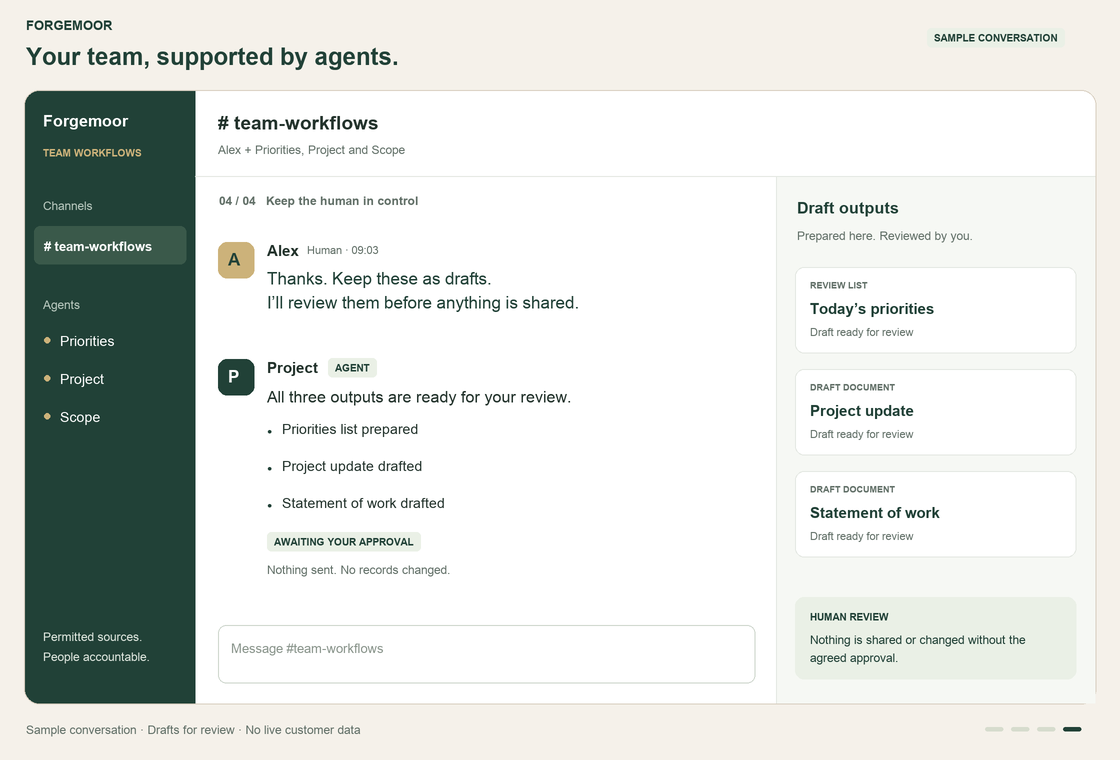
An assistant gathers permitted information and prepares a draft. This sample conversation shows a priorities list, project update and statement of work returned for review.
01 · Priorities
Alex: “@Priorities show today’s priorities”
The agent prepares a short list: review the sales handover, confirm the service owner and prepare for playback.
02 · Project update
Alex: “@Project prepare the project update”
The agent drafts progress, open decisions and next steps from approved project notes. No update is sent.
03 · Scope
Alex: “@Scope draft a statement of work”
The agent prepares scope, deliverables and open questions. Assumptions and commercials still need review.
04 · Human review
Alex: “Keep these as drafts. I’ll review them.”
All three outputs wait for human review. Nothing is shared and no business records are changed.
Sample conversation using invented content. Available actions depend on the connections and permissions we implement.
How do the connections work? ↓How the pieces fit
A request can bring together the right information, tools and specialist workflows. Salesforce remains the business platform beneath it, with access controls and human review designed into the process.
A request from your team
For example: prepare a sales handover in Slack
Workflow coordination
Understand the task · apply permissions · choose the next step
Permitted tools & business data
Records, approved knowledge and workflows
The appropriate AI capability
Agentforce or an optional model such as ChatGPT or Claude
A result ready for review
Check the draft and approve any permitted action
Salesforce
Your core business records, processes and permissions
MCP setup & connected AI
An assistant is more useful when it can work with the information your team actually uses. Model Context Protocol (MCP) is an open standard for connecting compatible AI applications to tools and data sources. It can be part of the connection between a conversation and your business systems.
Let an assistant retrieve permitted information from connected sources, instead of asking people to paste the same context into each task.
Bring relevant records and approved knowledge into summaries, handovers and updates, with sources your team can check.
Connect a request to a defined workflow, from gathering information to preparing an output or proposing a permitted action.
Where compatible tools are available, reuse a standard connection approach as you introduce more useful AI workflows.
What setup involves
We help identify the right use case, assess suitable connectors and configure the access needed for the agreed workflow.
MCP is a connection standard, not a security guarantee. Access controls, approval steps and monitoring need to be implemented and tested. Salesforce, Slack and other systems may use MCP, native connectors or APIs depending on the use case.
A sound foundation
Start with a practical task across sales, service or operations and define what a useful outcome looks like.
Review records, knowledge, data quality, permissions and the information an assistant would need.
Agree what can be suggested, what needs approval and how actions and exceptions will be recorded.
Choose Agentforce, a custom assistant or conventional automation according to the work and the constraints.
From idea to useful workflow
01
Agree the task, value, constraints and readiness.
02
Make the proposed workflow tangible using suitable sample information.
03
Check quality, permissions, review points and exception handling with your team.
04
Introduce the agreed solution, document it and support adoption.
If conventional automation is the better answer, we will recommend it. Your business does not need a complex agent system to make meaningful progress.
Bring us a task your team would like help with. We will explore the options and the controls it needs.
Talk to Forgemoor